Use Case
An executable model of business requirements that delivers specific business outcomes within the Use Case Tree
What Is a Use Case?
A Use Case specifies a distinct set of business requirements — ideally, but not necessarily, captured as an "executable model" — resulting in a specific business outcome.
Use cases start as ideas that can come from anyone in the organization at any time. These ideas are captured in the Use Case Tree — a data structure that organizes business capabilities into a hierarchical structure, starting on a whiteboard and showing how components of the business break down into smaller components.
Open Contribution Model
Anyone should be able to contribute ideas that may or may not end up as fully implemented use cases in the organization's Use Case Tree, whether they are viable or not. If an idea for a use case is rejected, the rationale should be shared with everyone so that everyone can learn and avoid wasting time on that idea again.
Let people contribute
A Use Case is a shared, living artifact across the full end-to-end lifecycle (Plan → Build → Run → evolve). Everyone involved — knowledge workers, specialist users, data architects, technical architects, ontologists, end users, business executives — literally anyone — should be able to read it, talk about the same Use Case (the same version), and contribute what they know as the work progresses.
Everything you do in and around a Use Case should be discoverable back in the Knowledge Graph, and be directly or indirectly related to that Use Case.
Strategic Context
-
Business identity and strategy: What is our business identity? Our mission and strategy? What do we do all this for (besides being profitable)? What are the long-term objectives we are going to achieve?
-
Technology landscape: How does that map to our current and future data and technology landscape? (Without becoming too technical or detailed — we want everyone to be able to contribute.)
-
Capability assessment: How do we Assess all our organization's capabilities, as specified in the Maturity Model for the Enterprise Knowledge Graph (EKG Maturity), related to our own EKG and how they match with our ambitions to implement our strategic use cases?
-
Technical debt: How does our "technical debt" fit in? (Identify the functionality of our technical debt as use cases in the tree as well.) How are we going to "rationalize" our current siloed landscape (and technical debt)?
-
Priorities and roadmap: What are the short- and long-term priorities? What are the milestones and the roadmap? (See "Chart".)
-
Transparency: Which ideas (for use cases) have been proposed, considered, approved, or rejected, and why?
What Is a Use Case in the Use Case Tree Method?
A Use Case in the Use Case Tree Method specifies a distinct set of business requirements — ideally captured as an "executable model" — resulting in a specific business outcome. Each use case is a node in the Use Case Tree, acting as a semantic package that can be discovered, versioned, and reused across the enterprise.
Relationship to UML Use Cases
The term "use case" has a specific meaning for technical audiences who typically assume it means what the Object Management Group (OMG) defines in their Unified Modeling Language (UML) and its "use case diagrams".
Although there are many similarities and overlap — which is why we are repurposing the term — it is not exactly the same in our Use Case Tree Method:
Key Differences
-
Broader abstraction: Use cases in the Use Case Tree Method are often used as a much broader and more abstract container concept compared to a UML Use Case. They can be organized in a "tree structure" where, at the highest levels, a use case can represent a capability domain or a "strategic use case" — basically anything that fits well with the business.
-
Reusable components: At the lowest levels in this tree, we end up with use cases that are much more like turn-key components for the EKG — 100% reusable, delivering "no-code"-functionality1.
-
Executable models: Unlike UML use cases, which are primarily descriptive, EKG use cases can be captured as executable models that run directly in the Enterprise Knowledge Graph platform.
-
Semantic packaging: Each use case acts as a semantic package containing ontologies, stories, data products, workflows, and other reusable components — similar to how software packages contain code, dependencies, and metadata.
Technical Implementation
From a technical perspective, a Use Case in the Use Case Tree Method:
-
Organizes related components: Groups together personas, concepts, stories, workflows, datasets, and ontologies that belong to the same business capability
-
Enables reuse: Provides a mechanism for discovering and reusing business logic, data models, and workflows across different contexts
-
Supports versioning: Can be versioned and evolved over time while maintaining backward compatibility
-
Facilitates testing: Provides the structure for defining test scenarios and ensuring 100% test coverage based on real business requirements
-
Enables composition: Can be composed with other use cases to create larger business capabilities, supporting the goal of Composable Business
Overview
A Use Case in the Use Case Tree Method is composed of multiple components that evolve throughout its lifecycle. These components work together to create a complete, executable model of business requirements.
Essential Elements
Every Use Case starts with these fundamental components, defined during the Plan Phase:
-
Name and description — Clear identification and purpose. This provides the foundation for all other components and enables discovery within the Use Case Tree.
-
Business outcomes — The desired or expected business outcome(s) and how they can be measured. These define success criteria and provide the "why" behind the use case. See Outcome for more details.
-
Personas — The personas of all the people and systems involved in the domain or scope represented by the Use Case. Personas define who (or what) interacts with the use case and their needs.
-
Concepts and manifestations — The concepts and their business or technical manifestations as used in the context of the Use Case. These form the vocabulary of the domain and link to the semantic models (ontologies) that will be developed. See Concept for more details.
Start simple, evolve iteratively
These essential elements can be defined at a high level initially — "mile wide, inch deep" — and refined as the use case progresses through its lifecycle.
Additional Elements (Later in Lifecycle)
As the Use Case moves into the Build Phase, additional components are added:
-
Stories — The functional requirements and business logic that implement the use case. Stories define what the use case does and can be implemented as executable functions or APIs. See Story for more details.
-
Datasets and ontologies — The data structures and semantic models that support the use case. Datasets provide the data, while ontologies define the meaning and relationships. See Data Product and Ontology for more details.
-
Workflows — The process flows and orchestration that coordinate multiple stories and data flows. Workflows define how different components work together to deliver the business outcome. See Workflow for more details.
Specialist Contributions
Throughout the lifecycle, specialists from various disciplines in the organization contribute additional details:
-
Business analysts — Detailed business rationale, tied to the business outcomes, and requirements refinement
-
Project managers — Milestones, versions, projects, timelines, roadmaps, and budgets
-
Development teams — Issues, tickets, and implementation details
-
Operations teams — Environment topologies, deployments, and configurations
-
Architects — Detailed information about dependencies, integrations, and technical relationships
Component Relationships
These components are not independent — they form an integrated whole:
- Personas interact with Stories to deliver Business Outcomes
- Stories consume and produce Data Products using Ontologies for semantic meaning
- Workflows orchestrate Stories to create end-to-end business processes
- Concepts link to Ontologies that provide the semantic foundation
- Use Cases relate to each other via is-part-of (ownership hierarchy) and is-used-in (dependency/reuse)
- All components are versioned, tested, and governed together as part of the Use Case
This integrated approach ensures that every component is traceable, reusable, and aligned with the business outcomes the use case is designed to deliver.
Continuous Improvement
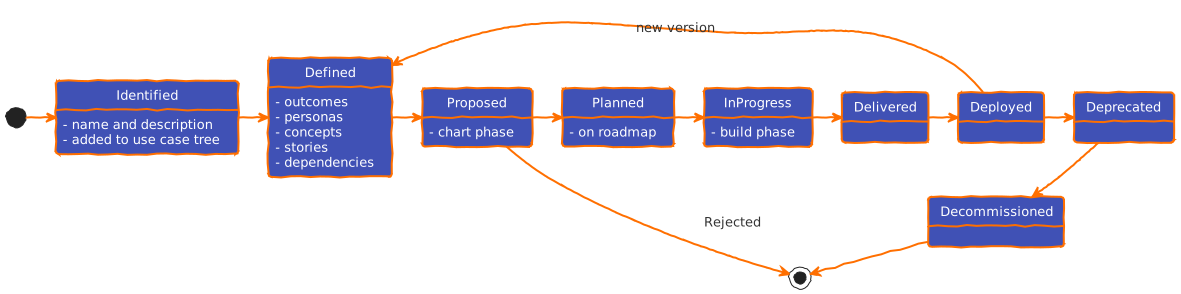
Each individual Use Case goes through a lifecycle of continuous improvement:2 This lifecycle spans the entire Use Case Tree Method process, from initial idea through planning, building, running, and ongoing optimization.
Lifecycle Stages
The Use Case lifecycle aligns with the three main phases of the Use Case Tree Method:
Plan Phase
During the Plan Phase, the use case starts as an idea and evolves into a well-defined requirement:
- Ideation — Initial concept or business need identified
- Discovery — Business opportunities and needs explored
- Definition — Essential elements defined (name, description, outcomes, personas, concepts)
- Scoping — Boundaries and dependencies identified
- Prioritization — Position in the Use Case Tree established
At this stage, the use case is "mile wide, inch deep" — broad in scope but not yet detailed in implementation.
Build Phase
During the Build Phase, the use case becomes executable:
- Design — Stories, workflows, and data models designed
- Development — Components implemented (ontologies, data products, stories)
- Testing — Test scenarios defined and executed, ensuring 100% test coverage
- Integration — Components integrated and dependencies resolved
- Verification — Business outcomes validated against success criteria
The use case transitions from a requirement to an executable, testable capability.
Run Phase
During the Run Phase, the use case operates in production:
- Deployment — Use case deployed to production environment
- Operation — Monitoring, maintenance, and support
- Measurement — Business outcomes measured and tracked
- Optimization — Continuous improvement based on performance data and feedback
- Evolution — Updates and enhancements based on changing business needs
The use case becomes a living, evolving capability that delivers ongoing business value.
Iterative Refinement
The lifecycle is not linear — use cases continuously evolve:
- Feedback loops — Learnings from Run phase inform future Plan and Build activities
- Incremental delivery — Use cases can be delivered in increments, with each increment building on the previous
- Versioning — Changes are versioned to maintain stability while enabling evolution
- Reuse — Successful use cases become reusable components for future use cases
Lifecycle as a learning cycle
The Use Case lifecycle is fundamentally a learning cycle. Each phase provides feedback that improves the next iteration, ensuring that the use case continuously aligns with business needs and delivers increasing value over time.
Relationship to Use Case Tree
The lifecycle of individual use cases is managed within the context of the Use Case Tree:
- Tree structure — The tree shows relationships and dependencies between use cases
- Governance — Changes to use cases are governed through the tree structure
- Reuse — The tree enables discovery and reuse of use cases across the enterprise
- Evolution — The tree evolves as use cases progress through their lifecycles
This ensures that individual use case lifecycles are coordinated and aligned with the broader enterprise strategy.
Use Cases Across the Use Case Tree Method Process
The Use Case Tree Method defines a process consisting of three phases, each with well-defined steps: Plan, Build, and Run.
The Use Case Tree is the common artifact across each of these phases — and most of their steps. As a use case progresses through these phases, different types of information become relevant and are captured within the use case.
Progressive elaboration
Use cases start simple in the Plan phase and progressively gain detail as they move through Build and Run. This approach ensures that investment is made incrementally, with each phase building on the previous one.
Information by Phase
The following shows what information is captured for each use case during each phase:
-
Plan Phase
- Name + Business Description
- Desired Business Outcomes
- Definition of Success
- Personas,
Concepts & Manifestations
- Add examples i.e. input for test scenarios
- Stories & Workflows
- High level but agreed, metrics-based estimates
- Tree Structure
- Break-down into existing or non-existing sub-use cases
(using
is-part-offor ownership oris-used-infor reuse) - Priority is to look up in the tree, not down, and define the longer-term "strategic use cases" as well
- Break-down into existing or non-existing sub-use cases
(using
-
 Build Phase
- Datasets
- Identify existing datasets or develop new Self-describing datasets (SDDs)
- Ontologies
- Map the given Concepts to the right Ontologies
- Test Scenarios
- Define test-datasets and test-scenarios for each Story
- Provision continuous integration pipelines for continuous automated testing
- Ensure 100% test coverage across all stories
- Story Implementation Details
- All optional — e.g. SPARQL, SHACL, SQL, workflow, audit, history, provenance, entitlements, caching policies, etc.
- Metrics
- Function point or story point-like metrics
- Lead / cycle time metrics
- Predict cost & delivery
- Based on metrics of previous use cases
- Datasets
-
Run Phase
- Operational Metrics
- Performance data and usage statistics
- Business outcome measurements
- Quality metrics and error rates
- Production Configuration
- Environment details and deployment info
- Monitoring and alerting setup
- Backup and recovery procedures
- Optimization Opportunities
- Performance improvements identified
- User feedback and enhancement requests
- Cost optimization insights
- Evolution Planning
- Updates and enhancements planned
- Version roadmap
- Integration with new use cases
- Operational Metrics
Phase Transitions
Use cases transition between phases based on readiness criteria:
- Plan → Build: When business outcomes are defined, personas identified, and high-level stories agreed upon
- Build → Run: When components are implemented, tested (100% coverage), and verified against business outcomes
- Run → Plan/Build: When optimization or evolution requires new planning or building activities
These transitions are not always linear — use cases may iterate within phases or return to earlier phases based on feedback and changing requirements.
Continuous Evolution
Even after deployment, use cases continue to evolve:
- Measurement drives understanding of what works and what doesn't
- Optimization improves performance and reduces costs
- Evolution adds new capabilities based on business needs
- Reuse enables other use cases to leverage successful components
This continuous evolution ensures that use cases remain aligned with business needs and continue to deliver value over time.
Related Approaches
The concept of Use Cases in the Use Case Tree Method shares similarities with several other approaches in enterprise architecture and software development. Understanding these relationships can help contextualize how Use Cases fit into broader industry practices.
Packaged Business Capabilities (PBCs)
Packaged Business Capabilities (PBCs) are a concept from composable commerce and enterprise architecture that emphasizes modular, reusable business components.
Similarities with EKG Use Cases:
- Modular design — Both PBCs and Use Cases represent self-contained business capabilities
- Reusability — Both are designed to be reused across different contexts
- Composability — Both can be composed to create larger capabilities
- Business focus — Both emphasize business value over technical implementation
Key Differences:
- Scope — PBCs are typically focused on commerce and business applications, while Use Cases in the Use Case Tree Method span all enterprise capabilities
- Semantic foundation — EKG Use Cases are built on semantic models (ontologies) that enable deeper integration and interoperability
- Executability — EKG Use Cases can be captured as executable models that run directly in the Enterprise Knowledge Graph
- Tree structure — Use Cases are organized in a hierarchical Use Case Tree that provides governance and dependency management
Learn More:
- WalkMe - Packaged Business Capabilities (PBCs)
- ElasticPath - What Are Packaged Business Capabilities (PBCs)?
UML Use Cases
As discussed in the Data & Tech Audience tab, Use Cases in the Use Case Tree Method share terminology with UML Use Cases but operate at a different level of abstraction.
Key Distinctions:
- Abstraction level — EKG Use Cases can represent entire capability domains, not just individual interactions
- Executability — EKG Use Cases can be implemented as executable models
- Semantic packaging — EKG Use Cases contain ontologies, data products, and workflows, not just interaction descriptions
- Tree organization — EKG Use Cases are organized in a hierarchical tree structure for governance and reuse
Microservices
Microservices architecture emphasizes building applications as collections of small, independent services.
Similarities:
- Modularity — Both emphasize breaking down capabilities into smaller, manageable components
- Independence — Both can be developed and deployed independently
- Composability — Both can be composed to create larger systems
Key Differences:
- Abstraction — Use Cases operate at a business capability level, while microservices operate at a technical service level
- Semantics — Use Cases are built on semantic models that enable deeper integration
- Business focus — Use Cases are defined by business outcomes, while microservices are defined by technical boundaries
- Reusability — Use Cases emphasize reuse of business logic, data models, and workflows, not just code
Domain-Driven Design (DDD) Bounded Contexts
Bounded Contexts in Domain-Driven Design define the boundaries within which a domain model is valid.
Similarities:
- Domain boundaries — Both define boundaries for business concepts and logic
- Contextual models — Both recognize that the same concept can have different meanings in different contexts
- Business alignment — Both align technical implementation with business domains
Key Differences:
- Scope — Use Cases can span multiple bounded contexts or be contained within one
- Executability — Use Cases can be captured as executable models
- Tree structure — Use Cases are organized in a hierarchical tree for governance
- Reuse focus — Use Cases emphasize reuse and composition across contexts
Summary
While Use Cases in the Use Case Tree Method share concepts with these related approaches, they are uniquely designed for the Enterprise Knowledge Graph context:
- Semantic foundation enables deeper integration and interoperability
- Executable models allow use cases to run directly in the EKG
- Tree structure provides governance and dependency management
- Business-first approach ensures alignment with business outcomes and value
Facts
About these facts
We're not prescribing a full OWL ontology here. These are minimal facts you can use to build your own ontology, schema, or graph model.
Use Case
-
- A Use Case must have an opaque, universally unique identifier.
- Prefer a random identifier such as UUIDv4.
- Represent it as a URI, for example:
Opaque universally unique identifier
urn:uuid:550e8400-e29b-41d4-a716-446655440000 -
Business-friendly name
- A Use Case must have a human-readable name that resonates with business users.
- This is what people see, say, and search for.
-
Slug
- A Use Case must have a slug: a kebab-cased identifier that is at least unique within the organization (and stable over time as much as possible).
- Example:
customer-360,reduce-churn-risk,supplier-risk-monitoring
-
Business-focused definition
- A Use Case must have a definition that explains what it is, in business terms.
- Keep it implementation-agnostic: focus on intent and value, not solutions.
-
One or more outcomes
- A Use Case must have at least one Outcome explaining why it exists and what contribution is expected.
- Outcomes can represent KPIs, goals, objectives, definitions of success, etc.
- What an Outcome is exactly is determined by its stereotype (e.g. KPI vs Goal), but the key is to capture expected short/mid/long-term outcomes.
-
Outcome relationships (supports inheritance and contribution mapping)
- Model the connection between a Use Case and an Outcome via an Outcome Relationship (not just a direct link).
- This enables a Use Case to relate to an Outcome it owns, and also enables a child Use Case to reference an Outcome defined on a parent Use Case (inherited) and capture how the child contributes to that desired Outcome.
-
Relationship: is-part-of (hierarchy and ownership)
- A Use Case can be part of exactly one other Use Case (zero or one cardinality).
- If a Use Case is part of another, it is a child-use case (or sub-use case).
- If it is not part of any other Use Case, it is a root-use case.
- This is the only relationship that implies ownership: the parent Use Case owns its child-use cases.
-
Relationship: is-used-in (dependency and reuse)
- A Use Case can be used in zero or many other Use Cases (zero to many cardinality).
- Use cases that are "used in" others are generally treated as sub-use cases in that context, but they are not owned by the referring Use Case.
- This relationship enables cross-tree dependencies and identifies reusable building blocks that serve multiple business areas.
Colloquial Parents
Use cases referred to via either is-part-of or is-used-in
are colloquially known as parent use cases. In this
sense, a Use Case can have multiple parents, but only the
one linked via is-part-of is the "REAL" parent that owns it.
-
Use Case stereotype (optional, organization-defined)
- A Use Case can have a Use Case Stereotype.
- By default, the stereotype is simply “Use Case”.
- Many organizations use different type names for scopes that are effectively the same concept in the Use Case Tree Method. A stereotype makes the Use Case recognizable in the local language without changing the underlying model.
- Organizations can define any number of stereotypes and how they interrelate, including constraints like “allowed parent stereotypes” and “allowed child stereotypes”.
- Common examples include Business Capability Area, Business Capability Domain, Data Domain, Technical Capability, Application, and API Service.
- For detailed information about use case stereotypes and how to define them, see the Use Case Stereotype page.
-
Stories (optional, owned)
- A Use Case can have zero or more Stories.
- The relationship is part-of: the Use Case owns its Stories.
- If the Use Case is deleted, its owned Stories are deleted as well.
-
Workflow definitions (optional, owned)
- A Use Case can have zero or more Workflows.
- More precisely: these are WorkflowDefinition objects (the definition, not a run).
- The relationship is part-of: the Use Case owns its workflow definitions.
- If the Use Case is deleted, its owned workflow definitions are deleted as well.
-
Persona taxonomy (optional, SKOS scheme)
- A Use Case can have zero or one PersonaTaxonomy.
- A PersonaTaxonomy is a
skos:ConceptSchemethat groups the Personas relevant for the Use Case. - Personas are
skos:Conceptand are members of exactly one PersonaTaxonomy viaskos:inScheme.
-
Concept vocabularies (optional, mixed)
- A Use Case can have zero or more relationships to Concept Vocabularies.
- It may reference an external Concept Vocabulary, and/or own a private Concept Vocabulary.
- A Concept Vocabulary contains Concepts.
- Stories relate to Concepts via a relationship-object that captures usage type:
- Input Concept — required/mandatory input parameter (or optional)
- Output Concept — definition of the output (often a shape/compound object)
- Dependent Concept — referenced in filters/constraints (e.g., SQL/SPARQL
WHERE)
How it fits with Concepts & Manifestations
In the Use Case Tree Method, Concepts & Manifestations capture the shared vocabulary and intent. Ontologies make that vocabulary precise and machine-actionable (identifiers, relations, constraints, and alignment to standards).
Learn more in Ontology.
Governance and reuse (pragmatic guidance)
- Reuse first: adopt/align to existing ontologies before creating new ones
- Versioning: track ontology/schema versions alongside the Use Case version
- Change impact: semantic changes can break queries, validation, and workflows
- Interoperability: shared semantics are a primary driver for cross-domain reuse